
What is stick drift?
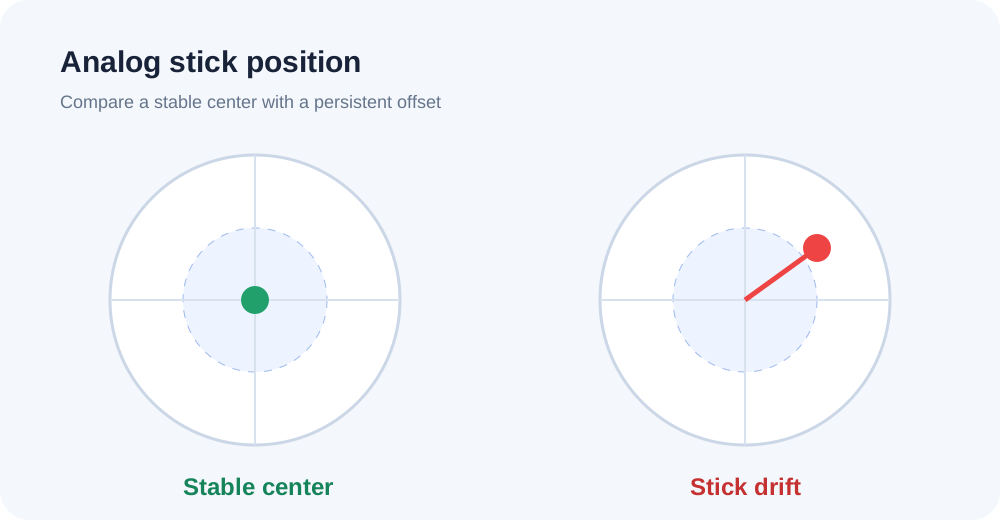
Stick drift happens when an analog stick sends movement input even though you are not touching it. In games, this can make a character walk, a camera move, or a cursor drift on its own.
Common signs of analog stick drift
Typical signs include a slowly moving camera, character movement without stick input, trouble holding a direction, or an axis that does not settle near center after you release the stick.
How to check stick drift in ACC64
Use USB or Bluetooth, then press a controller button so the browser can detect it.
Launch the ACC64 Gamepad Test. There is no software to install and no account is required.
Leave both sticks untouched and watch whether the readings stay near center.
Move each stick up, down, left, right, and around the full circular range.
Let go of the stick and check whether the reading returns to a stable neutral position.
How to interpret the axes and drift result
The key question is whether the reading settles close to neutral after you release the stick or remains consistently offset in one direction. ACC64 does not impose one universal percentage threshold because small deviations can matter differently depending on the controller, game, and deadzone setting.
What is a deadzone?
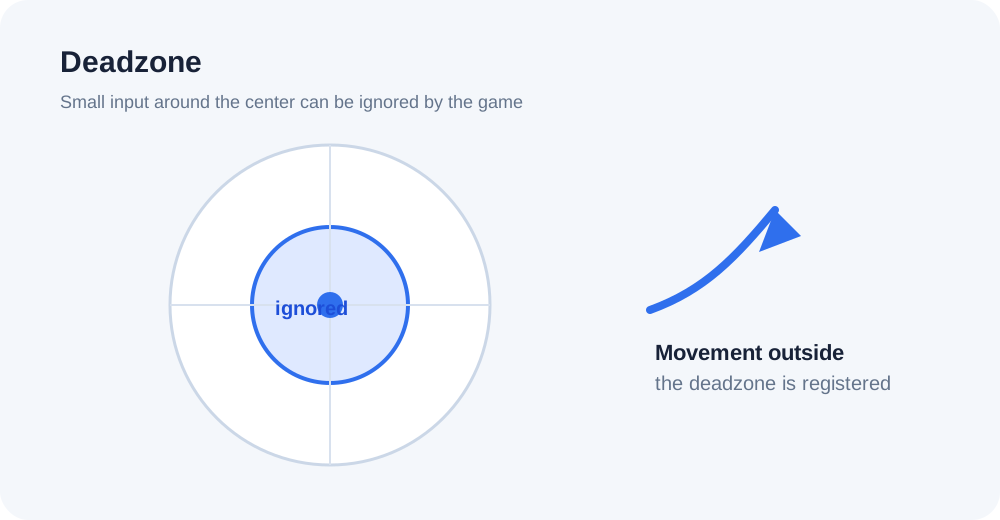
A deadzone is a small range of analog input around the center that a game or control system ignores. Increasing it can reduce the effect of minor drift, but an excessively large deadzone also reduces control precision.
If the offset is small and your game provides a deadzone setting, a modest increase may stop unwanted movement. This masks the symptom; it does not repair the analog mechanism.
If drift is strong, gets worse, jumps unpredictably, or requires a large deadzone to make the controller usable, the issue may be hardware-related. Follow the manufacturer’s guidance for cleaning, service, or warranty support. The tester can identify the behavior, but it cannot repair physical damage.
Frequently asked questions
What is stick drift?
It is unwanted analog movement input while the stick is at rest. It can move a character, camera, or cursor without intentional input.
How do I test controller stick drift?
Connect the controller, open ACC64 Gamepad Test, leave the sticks at rest, then move them through their full range. Check whether the readings return steadily near center after release.
What level of stick drift is normal?
There is no single universal threshold for every controller and game. Judge how stable the neutral position is and how the controller behaves in the game you use.
Does increasing deadzone fix stick drift?
No. It can reduce the effect of minor drift, but it does not repair wear or physical damage inside the stick mechanism.
Does the tester work with Xbox and PlayStation controllers?
Many Xbox and PlayStation controllers can be detected by browsers over USB or Bluetooth, but support and mapping depend on the browser, operating system, and controller model.
Why does my browser not detect the controller?
Check the USB or Bluetooth connection, press a controller button, and refresh the page if needed. Browser and operating-system support can also affect detection.